



I’ve been working on proofing LunyScript concepts and architecture. For Xmas I want to share an update about key design elements and decisions.
LunyScript Example
I wanted to make sure above all else how writing LunyScripts will be like, and how they load and connect with objects. It turns out it works even better than I imagined.
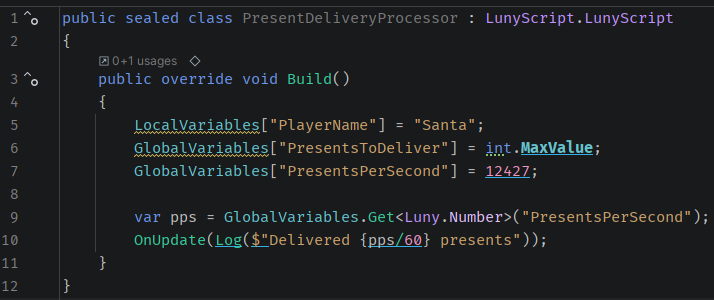
Here’s an example LunyScript, fully functional (though it only prints messages for now):
To using or not to using?
Notice the somewhat ‘luny’ LunyScript.LunyScript base class. This is due to the ambiguity of namespace and class: they both have the same name.
Normally, you’re supposed to avoid such a name clash. In this case it comes in handy because this avoids having a using LunyScript; statement at the top.
For the moment I like it, though I’m not sure if it’ll stick.
Build() it and they will run ..
A LunyScript only needs to override the Build() method.
The entire script is frontloaded, with any runtime evaluation having to be encoded via the LunyScript API - which currently only runs block sequences. More complex processing via Statemachines and Behavior Trees will come later.
This allows for efficient runtime execution as a tight loop races over all blocks from a central game loop provided by LunyEngine and an engine-specific Lifecycle adapter that auto-instantiates when the game launches, with zero setup friction.
Scripts Auto-Run by Default
When a scene object (GameObject/Node/Actor - different semantics, same thing) is created via instantiation or upon loading a scene, the LunyScriptRunner is made aware of that at the beginning of frame processing.
If a new scene object’s name matches (default) or starts with (configurable) the name of a script (here: PresentDeliveryProcessor) then this script’s Runnables will be part of frame processing and thus control that scene object.
To avoid confusion due to spelling mistakes, there will be logs and later LunyScript’s own diagnostic window.
Interaction with Engine-native Scripting
Use cases where engine-native scripts also influence a LunyScript-controlled object are considered.
Almost certainly ‘structural changes’ like creation and destruction or visibility/pause state of objects will have to be done via the LunyScript API in a straightforward manner, ie by replacing Object.Instantiate(..)/Object.Destroy(..) with LunyObject.Instantiate(..)/LunyObject.Destroy(..).
I also aim to provide an alternate Spawn/Despawn pair which will provide automatic object pooling and state reset.
LunyEngine Driver
The engine lifecycle (OnStartup/OnShutdown) and heartbeat (OnFixedStep/OnUpdate/OnLateUpdate) events are propagated by LunyEngine to any IEngineLifecycleObserver implementation.
These engine-native implementations are found via reflection when the player launches, and instantiated. From then on, they are like mini-engines getting events forwarded by LunyEngine. One such observer is the LunyScriptRunner that drives LunyScripts.
You can write your own observers for central processing of engine objects without needing to consider engine-specific behaviour variations. In fact, a major point of the Luny cross-engine integration is to define and standardize behaviours we can rely on in any engine.
Engine API Integration
LunyEngine also provides access to mandatory IEngineService implementations - these are hardwired properties like Application, Debug, Scene and accessible via the singleton instance: LunyEngine.Instance.Debug
An Editor service is also provided, whose functions you can leave embedded in your code. It will not fail to create or run builds but rather result in a no-op or even get stripped by the linker.
Engine implementations may provide optional services. These can be queried via LunyEngine.Instance.HasService<ITerrainService>() and .. GetService<ITerrainService>().
Since the service interfaces are owned by Luny, one can’t simply add or modify the service features. However an engine can provide engine-native extensions by implementing custom extension interfaces implementing IEngineService. Thus engines can provide native features, for instance GetService<ICinemachineService>() or GetService<IPhantomCameraService>() - though it would be preferable if those two would have a common base interface providing shared functionality.
Unity Code Stripping Woes
Since LunyScripts, as well as the lifecycle observers and engine-native services will be found via reflection, I knew they could get stripped by Unity’s linker regarding them as “unused” code, particularly with the highest ‘Managed Code Stripping’ level.
Thus I added an editor build script implementing IUnityLinkerProcessor. This creates a linker XML file with types that musn’t be stripped. Since I already have a type discovery helper it was easy to hook this into the build process to generate this:
<linker>
   <assembly fullname="Luny.Unity">
      <type fullname="Luny.Unity.Services.UnityApplicationService"/>
      <type fullname="Luny.Unity.Services.UnityDebugService"/>
      <type fullname="Luny.Unity.Services.UnitySceneService"/>
      <type fullname="Luny.Unity.Services.UnityTimeService"/>
   </assembly>
   <assembly fullname="Luny.Unity">
      <type fullname="Luny.Unity.UnityLifecycleAdapter"/>
   </assembly>
   <assembly fullname="LunyScript">
      <type fullname="LunyScript.LunyScriptRunner"/>
   </assembly>
   <assembly fullname="Assembly-CSharp">
      <type fullname="ExampleLunyScript"/>
   </assembly>
</linker>
Thus Unity linker won’t strip engine services, the lifecycle adapter, the LunyScript runner, nor a user’s LunyScripts.
Summary
That was more than I intended to write. Merry Xmas! :)
If you have any questions or feedback, don’t hesitate to contact me:
- via Discord
- via Youtube - Leave a comment on any video.
- via Unity Discussions - DM or start a new topic that includes
@codesmile - via email - Caution: I get a lot of spam and am aggressively filtering my inbox - best to ping me via other channels.
And of course:
- Join my Patreon for newsletter & contact - Reply to any newsletter I send twice per month (on average).