



Breaking: 100 Stars Milestone! :)
Happy to see this today:

Just as happy as when LunyScript reached 50 stars:
Admittedly, I have since adjusted the 100+ stars milestone dates. I pushed this milestone from Jan 15th up to Feb 02 due to the post-Xmas slump. And because I didn’t further promote the project on social media - I’m afraid of hyping it up before I even got any funding secured.
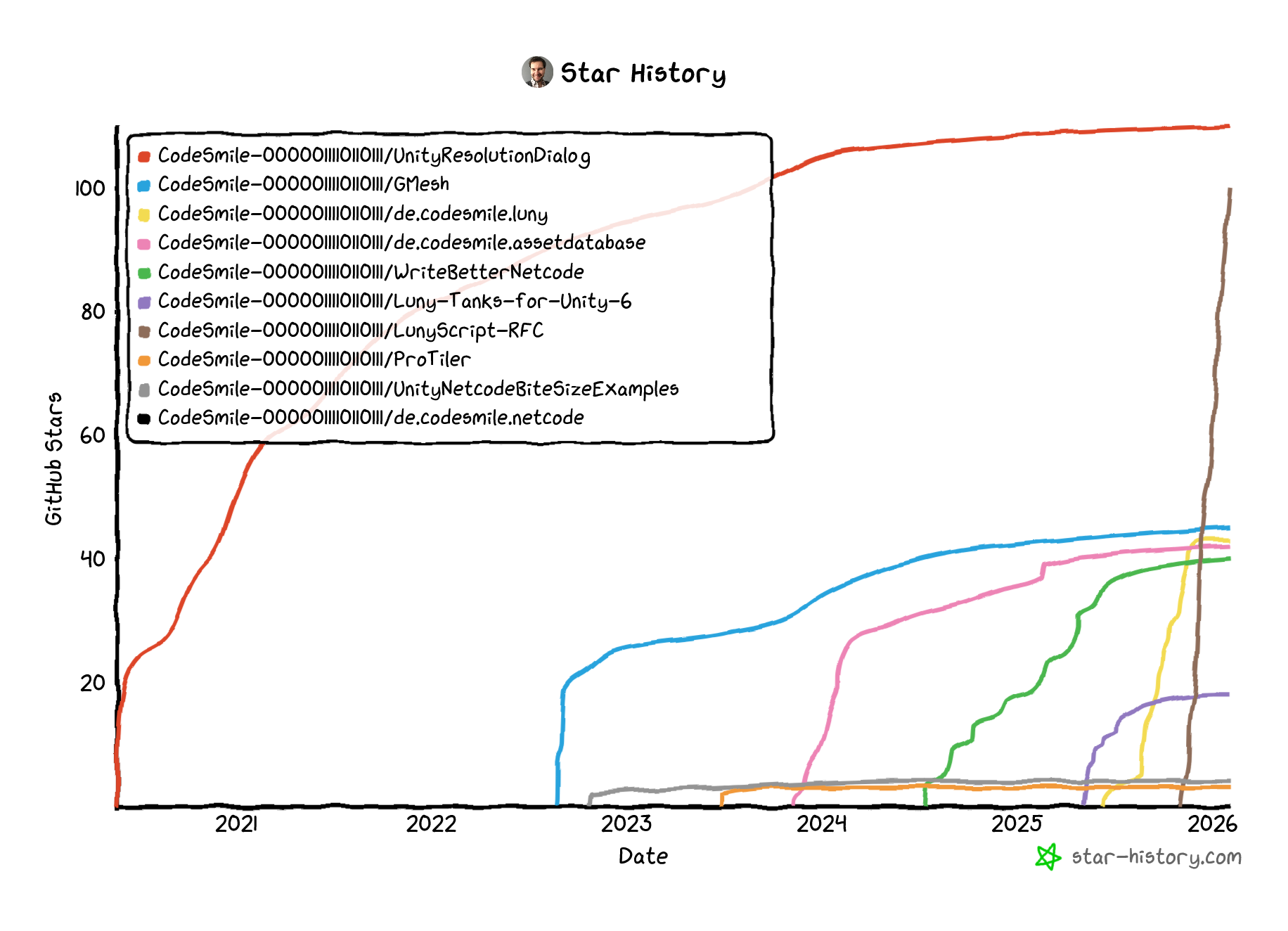
Nevertheless, it’s going straight up compared to my other public repositories:
Quick Progress Update
I mostly focus on workflow and development infrastructure right now. I want to start running once the project gets greenlit.
Single Solution, All Engines
I now work in a single solution containing both engine-agnostic and engine-native (Godot, Unity) code. It compiles and runs tests!
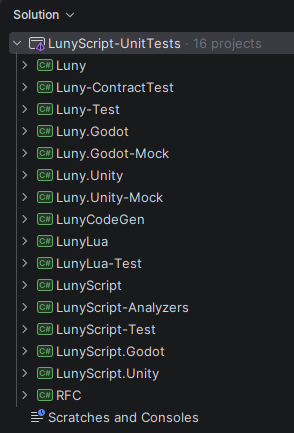
I’m mocking all the engine APIs LunyEngine uses, with contract tests verifying engine behaviour (eg order of events). The native layers are ultra-thin anyway, so AI is quick to generate mocks for them even when flying blind: AI just knows engine core behaviours and APIs.
This warrants a separate post -> coming soon.
Duck-Typing Types
LunyEngine now has variant Variable and Number structs representing duck-typed values.
The sizeless Number struct is internally a double. Variable can hold either a number, a boolean, or a string. Both perform comparisons, arithmetics, implicit conversions just as you would expect from duck-typed values.
This is modeled after Lua’s behaviour, and to complete this there’s also a Table collection type holding variables.
I included the Lua-CSharp project (Lua implemented entirely in C#, faster than MoonSharp) and prepared a Code Generator project to create the Lua bindings. Luny’s Number/Variable types aren’t using Lua - the intention is to make them convert from Lua’s types (LuaValue, LuaTable).
This also warrants another post.
LunyScript: Flow, Logic, and Variables
I added essential flow constructs to LunyScript block execution:
If(conditions).Then(actions)
.ElseIf(conditions).Then(actions)
.Else(actions)

For(n).Do(actions)     // runs Do() n times: from 1 to n
For(-n).Do(actions)    // runs Do() n times: from n to 1
For(n, 2).Do(actions)  // runs Do() with n = 1, 3, 5, 7, ..
For(-n, 2).Do(actions) // runs Do() with n = .., 8, 6, 4, 2

While(conditions).Do(actions)
While loops won’t ‘freeze’ the editor or game because they have a configurable “max iterations” - which throws an exception if the max is hit (default: one million iterations).
And there are also logical operators now:
AND(conditions)
OR(conditions)
NOT(condition)

// example:
OR(c1, AND(c2, NOT(c3)))
Variables can now be scripted:
var otherVar = Vars("other");
Var("name").Set(otherVar)
Var("name").Add(otherVar)
Var("name").Sub(otherVar)
Var("name").Mul(otherVar)
Var("name").Div(otherVar)
Var("name").Inc()
Var("name").Dec()

// works with native value types too
Var("name").Set("some text")
Var("name").Add(1.2345)

// condition examples:
Var("name").IsEqualTo(otherVar)
Var("name").IsAtLeast(15)

// conditions support operators too:
If(Vars("hp") < 10).Then(..)
If((otherVar - 1) >= 0).Then(..)
You can work with variables in blocks quite naturally:
var hp = Vars("hp");
var hpMax = Vars("hp-max");
var regenRate = Vars("regen-rate");

// regenerate hitpoints
When.Self.Updates( If(hp < hpMax).Then(hp.Add(regenRate)) );
GDSharp - GDScript for C# developers
I kept losing track looking at all the _snake_case and SHOUTING_CONSTANTS in my plugin.gd. It felt like an awful lot of noise to me.
So I started an experiment, had AI wrap this up for me and provide me with GDScript wrappers that follow C# guidelines.
The result is GDSharp (GD#), here’s a contrived example:
@tool
extends EditorPlugin

# usings
const File = Gds.File

const SomePath = "scenes/main.tscn"

func DoSomethingWithFile() -> void:
    var file = File.OpenReadable(SomePath)
    if not file:
        return

    var content = File.ReadAllText(file)
    File.Close(file)

    file = File.OpenWritable(path)
    if file:
        File.WriteAllText(file, newContent)
        File.Close(file)
It wraps just what I needed but I hope GDSharp can become an ‘alternative fact’ for Godot developers. I’m sure developers with C# experience who will be inclined, if not forced, to use GDScript will find GDSharp more relatable when it follows ‘sane’ (known) style guides.
Might also warrant a separate post.
Misc Updates
A minimal asset loader also exists for both engines which currently loads “prefab” types by path. This fills the last gap required to build out the actual LunyScript API and make it functional.
I’ve also added a Roslyn Analyzer project. This will be instrumental for custom extensions to the LunyScript API.
For “project management” I experimented with logseq but ultimately went back to a simple text-based tasklist. AI helps to keep this organized.
Lastly, I renamed the example projects before anyone starts cloning them. “LunyScratch” is now “LunyScript”. The Godot and Unity example project repositories can be found here: