🤗👍️👉




The Luny repositories follows a modular architecture with clear separation between:
.Unity, .Godot, etc.)Note: The current setup will not allow multiple LunyEngine-based frameworks to coexist in the same engine project. This will be improved in the future.
For development:
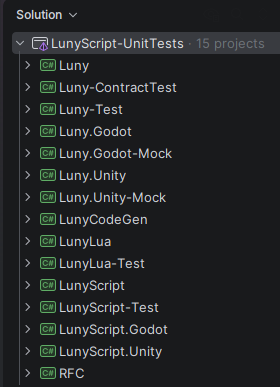
The Luny Development Solution has engine API mocks/shims to compile, refactor, generate, and test engine-native code without the native engines.
Luny frameworks should be imported into projects via the engine-native concept of a ‘plugin’ (package).
addons/ folder, then enable pluginFully operable engine projects for LunyScript development:
Note: I will most likely rename the example repositories in the future, replacing ‘Scratch’ with ‘Script’.
These repositories contain documentation, design, notes.
Unit testing:
This outlines the high-level steps. Where in doubt analyze and follow LunyScript’s repository structure and setup.
This assumes that your framework is named ‘MyFramework’ - adjust as needed. If Luny becomes popular this process will be eased eg via setup scripts - I understand it’s more than ‘the usual’ and seems complicated at first.
MyFramework-Examples-<Engine> engine-native project repositories, one per engine. Replace <Engine> with the name of the engine.MyFramework.UnityPackages/com.<yourdomain>.myframeworkMyFramework.Godotaddons/myframeworkLunyLuny.<Engine>MyFrameworkMyFramework.<Engine>Tests are co-located within their respective modules:
Luny/Tests/ - Core framework testsLuny.Unity/Tests/ - Unity integration tests (includes test scenes)MyFramework/Tests/ - Script system testsMyFramework.Unity/Tests/ - Unity-specific script testsYour MyFramework Godot addon structure should look like this:
addons/
└── myframework/
    ├── plugin.cfg                 # Godot plugin config
    ├── Luny/                      # submodule
    ├── Luny.Godot/                # submodule
    ├── MyFramework/               # submodule
    └── MyFramework.Godot/         # submodule
This package is included as submodule in the MyFramework-Examples-Godot project and located in addons/myframework.
Your MyFramework Unity package structure should look like this:
Packages/
└── de.<yourdomain>.myframework/
    ├── package.json               # Unity UPM package manifest
    ├── Luny/                      # submodule
    ├── Luny.Unity/                # submodule
    ├── MyFramework/               # submodule
    └── MyFramework.Unity/         # submodule
This package is included as submodule in the MyFramework-Examples-Unity project and located in Packages/de.<yourdomain>.myframework.
Ensure MyFramework Assembly Definition has No Engine References checked and depends on Luny. While MyFramework.Unity depends on both Luny and Luny.Unity.
Create Runtime or Editor folders as needed only within the MyFramework.Unity/ subfolder - don’t nest everything under Runtime or Editor folders!
This showcases the structure of a Unity upm package to get an idea of what it looks like. The Godot ‘addon’ directory structure is practically identical.
de.codesmile.lunyscript/ (submodule in project, located in: Packages/de.codesmile.lunyscript)
├── package.json               # Unity UPM package manifest
├── README.md                  # Plugin readme
├── ...                        # Any other plugin files or support code
│
├── Luny/ (submodule)          # Core engine framework (engine-agnostic)
│   ├── Core/                  # Logging, number utilities, trace logging
│   ├── Engine/                # Engine abstraction layer
│   │   ├── Bridge/            # Engine adapter interfaces
│   │   ├── Identity/          # Object identification structs
│   │   ├── Services/          # Service registry pattern
│   │   └── Diagnostics/       # Profiling and logging
│   ├── Exceptions/            # Framework-specific exceptions
│   ├── Extensions/            # Utility extensions for System types
│   └── Tests/                 # Core framework tests
│
├── Luny.Unity/ (submodule)    # Unity-specific engine integration
│   ├── Engine/
│   │   ├── Bridge/            # Unity adapter implementation
│   │   └── Services/          # Unity service implementations
│   ├── Editor/                # Unity Editor utilities
│   │   └── Linking/           # Linker stripping hints
│   └── Tests/                 # Unity integration tests
│
├── LunyScript/ (submodule)    # Scripting DSL (engine-agnostic)
│   ├── Blocks/                # Scripting blocks
│   │   ├── Debug/             # Debugging blocks
│   │   ├── Editor/            # Editor-related blocks
│   │   ├── Engine/            # Engine lifecycle blocks
│   │   ├── Object/            # Object manipulation blocks
│   │   ├── Run/               # Execution control blocks
│   │   └── Scene/             # Scene management blocks
│   ├── Core/                  # Script definitions, variables, IDs
│   ├── Diagnostics/           # Profiling and logging
│   ├── Events/                # Event scheduling and response
│   ├── Execution/             # Script runner, activator, context
│   ├── Runnables/             # Executable script interfaces
│   └── Tests/                 # Script system tests
│
├── LunyScript.Unity/ (subm.)  # Unity-specific scripting integration
│   ├── Editor/                # Unity Editor tools for LunyScript
│   └── Tests/                 # Unity-specific script tests
│
└── LunyLua/ (submodule)       # Lua runtime integration
    └── Lua-CSharp/            # Lua C# bindings
The repository uses git submodules extensively for modular development:
Packages/de.codesmile.lunyscript is the main submoduleLuny/, Luny.Unity/, LunyScript/, etc.) are also git submodulesTo ensure proper submodule workflows one must first commit to submodules before committing repositories containing a modified submodule. A pre-commit hook that verifies this and prevents “detached head” issues is included below.
This avoids all of the frustrations developers without submodule experience usually face when first working with submodules. Submodules are otherwise fine, except that you manage multiple repositories.
Save this script in the project’s repository root under .git/hooks as pre-commit text file. Only add this to the root repository, not in any of the submodules.
This pre-commit hook prevents commits if a submodule is “dirty” and should be committed first. If that is the case, a message pops up instructing you to first commit the submodule (you do not lose any changes). Works with both command line and git GUI tools (eg SourceTree).
#!/bin/sh

# Check if any submodule has uncommitted changes
git submodule foreach --quiet --recursive '
    if [ -n "$(git status --porcelain)" ]; then
        echo "ERROR: Submodule $path has uncommitted changes!"
        echo "Commit submodule changes first, then commit parent."
        exit 1
    fi
'

# Check if any submodule has unpushed commits
git submodule foreach --quiet --recursive '
    LOCAL=$(git rev-parse @)
    REMOTE=$(git rev-parse @{u} 2>/dev/null || echo $LOCAL)
    if [ "$LOCAL" != "$REMOTE" ]; then
        echo "ERROR: Submodule $path has unpushed commits!"
        echo "Push submodule changes first, then commit parent."
        exit 1
    fi
'
On Linux/OS X you may have to give execute permission to the file. Review the git hook documentation.